
Product updates

A clear record of what shipped.

Follow meaningful product changes across the starter, dashboard, billing, and AI workspace.

Latest release
v0.3.17
Release cadence
Continuous
Starter coverage
4 frameworks

Breaking changes for self-hosted deployments

  • Worker secrets are no longer in wrangler.jsonc. JWT_SECRET (node1) and ZSHIP_KEY (every worker that has it) were removed from plain vars. Before deploying this version, set them as secrets: wrangler secret put JWT_SECRET on node1, and one shared, strong ZSHIP_KEY on node1, node2, node3, node9, node10, node11, Provider1 and Enterprise Billing. If you deployed earlier versions without replacing the placeholders, rotate both now: the defaults are public. For local development, copy each service’s .dev.vars.example to .dev.vars (the dev console does this for you).
  • apps/web was removed. The Astro template now lives in apps/web-astro. Move your customizations there before updating.
  • The template /changelog page reads local Markdown. Add entries as Markdown files with version, title and date frontmatter, one folder per locale: content/changelog/ in Nuxt, src/content/changelog/ in Astro, SvelteKit and TanStack (see each template’s README). The ZSHIP_CORE_SERVICE binding is internal to ZShip and is no longer part of the templates.
  • Custom domains are no longer preset. node6 and node10 no longer ship cdn.zship.ai / media.zship.ai routes. Add your own routes, and set IMAGE_AGENT_MEDIA_PUBLIC_URL on node10; until it is set, Image Agent media returns IMAGE_MEDIA_NOT_CONFIGURED.

Test accounts

  • Admin → Test Accounts creates a test user for a project, with optional seeded credits, a subscription and one-time orders taken from the project’s price config.
  • Each account gets a reusable sign-in link (1–90 days, default 7) that opens the site already signed in. The token is shown once; links can be reissued or revoked, and accounts can be disabled.
  • Test orders use the test provider. They appear in the order history but are excluded from revenue, order and paying-user statistics, and never send paid-order notifications or create affiliate commissions. Cancelling, resuming or changing a test subscription is simulated without calling Stripe.
  • Supported in the Nuxt and Astro templates at /auth/test-login.

Credits

  • Subscription credits are now spent before permanent credits.
  • Failed generation refunds return credits to the bucket they were taken from, with the original expiry. If those subscription credits have already expired or been reset, that part is not refunded.

Image Agent

  • KIE Nano Banana 2 accepts up to 14 reference images, so the Agent can edit an existing image instead of regenerating it from text.
  • Uploaded references and results are stored privately per user and served through short-lived signed links on a dedicated media host.

Decision models

  • Admin → AI → Decision maps scenarios (moderation, support tickets, feedback) to Cloudflare Clef models with per-scenario pricing. Provider image moderation and support ticket triage can use them.

Migrations for self-hosted deployments

Apply before deploying the matching worker: node1 0041_test_accounts.sql; Provider1 0035–0037; node10 0018–0019; node2 0012.
Dodo Payments and Waffo Pancake

  • The payment service now supports Dodo Payments and Waffo Pancake alongside Stripe and Creem. Both are integrated over their REST APIs without adding an SDK dependency.
  • Checkout, customer portal links, and webhooks cover one-time credit packs, subscription activation and renewals, cancellations, and refunds. Credits are granted and revoked with the same idempotency rules as the existing providers.
  • Webhooks must be signed: Dodo requests are verified with Standard Webhooks HMAC signatures, and Waffo requests with RSA signatures against the Waffo platform public keys. Unsigned or invalid requests are rejected.
  • The official Nuxt, Astro, TanStack, and SvelteKit templates send checkout to whichever provider is bound to the project.

Where to configure

  1. Admin → Pay Channels: create a Dodo channel (API key, webhook signing secret, test or live environment) or a Waffo channel (Merchant ID and API private key).
  2. Admin → Projects → Edit project → Payment: bind the channel. Each project uses one provider.
  3. Admin → Price Config: fill in the Dodo product ID (pdt_…) or the Waffo product ID (PROD_…).
  4. In the provider dashboard, register the webhook URL https://<node3>/dodo/webhook or https://<node3>/waffo/webhook. For Waffo, register it once for test and once for production.

Notes

  • ZShip coupons are not applied to Dodo or Waffo checkout yet, so the pricing page hides coupon entry for those providers.
  • In-app plan changes and cancellation remain Stripe-only. Dodo and Waffo subscribers manage their subscriptions in the provider portal.
  • Self-hosted deployments need the node3 D1 migration 0015_dodo_waffo_providers.sql before deploying the new code.

Image Agent

  • The official Nuxt dashboard now includes an Image Agent for discussing images, generating new ones, and editing existing ones.
  • Accepted work continues on the server if you leave the page. You can reconnect to the same run or stop it, and the workspace shows the credits used by the selected image model.
  • Reference images can be added by upload, link, or the material library. Generated images keep their version history.
  • Image models whose provider has no durable image delivery can now be used as well; their results keep the provider’s image URL.

Open Dashboard → Image Agent (/dashboard/image-agent).

Admin

  • Admin → AI → Image Agent sets the Agent’s model, the on/off switch, and per-run limits for steps, operations, and credits.
  • Provider task rows created by the Agent now link to the dialogue charges of that run.

Project-level daily free credit caps

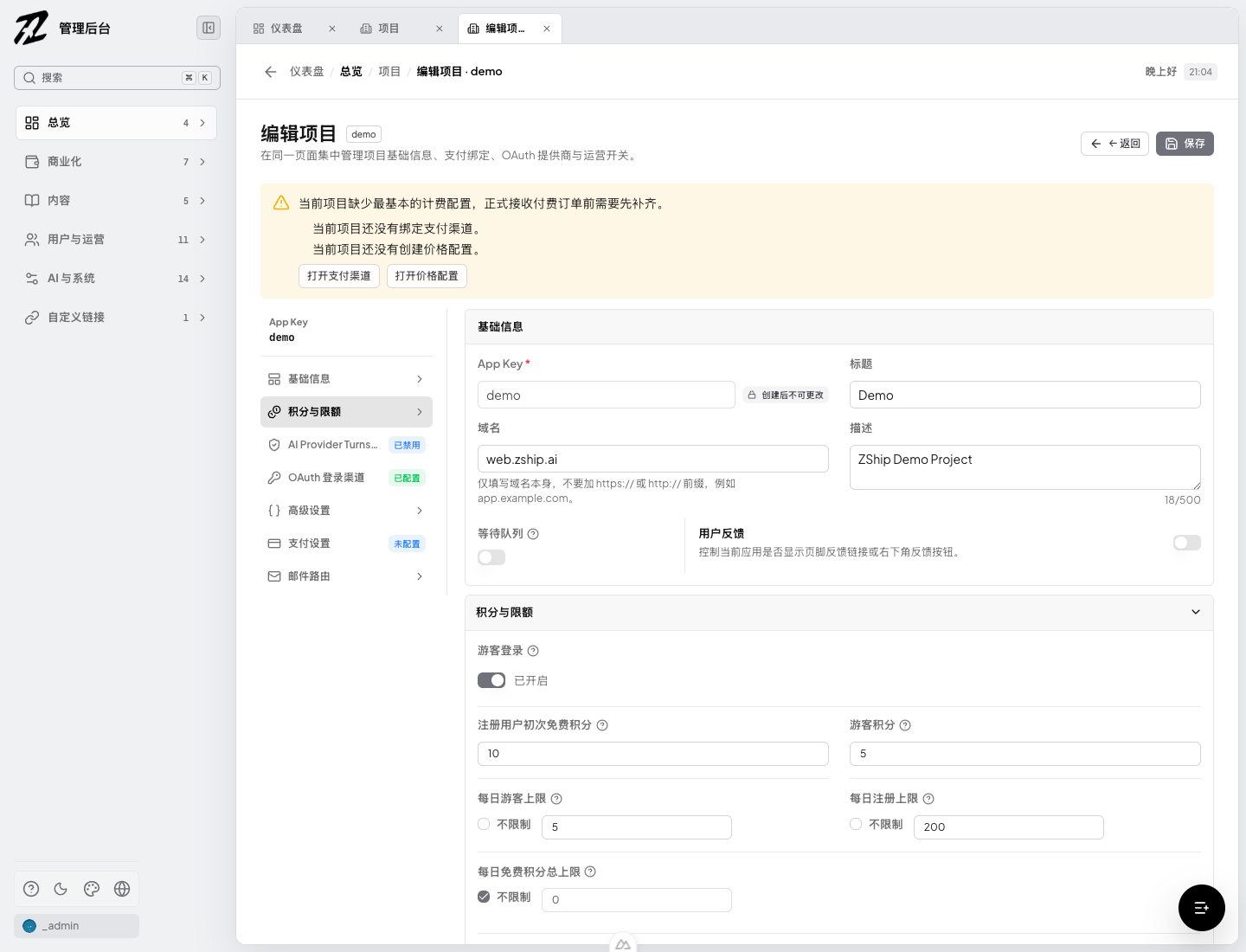
  • Admin project settings can now set a daily free-credit cap for each project; 0 remains unlimited.
  • The cap combines initial credits issued to guests and registered users within each UTC day, so switching account type cannot bypass the project budget.
  • Requests that would exceed the cap are rejected before credits are granted, while an atomic D1 guard protects concurrent requests from over-issuing credits.

Where to configure

Open Admin -> Projects -> Edit project -> Credits & limits to set the daily guest, registration, and aggregate free-credit caps.

Daily free credit limit settings in the ZShip Admin

Seven new AI models and Qwen branding

  • Added seven ready-to-use model configurations to AI Playground: WaveSpeed Seedance 2.5, Qwen Image 3.0, and MiniMax H3; plus KIE Seedance 2.5, MiniMax H3, Qwen3 text-to-image, and Qwen3 image-to-image.
  • Model availability is loaded dynamically from the provider service, so newly enabled models appear after a refresh without requiring a separate frontend release; cached sessions may take up to five minutes to refresh.
  • Corrected Qwen model branding to use the official Qwen logo instead of the Alibaba Cloud group mark.
  • WaveSpeed models require a WaveSpeed API key to be configured before generation requests can succeed.

Safer official templates and stronger release checks

  • Synced the official Nuxt, TanStack Start, SvelteKit, and Astro templates to the current product-quality baseline while preserving repository-specific configuration.
  • Strengthened BFF and proxy contracts for tenant-scoped requests, authenticated routes, and guest-access switches, with dedicated CI coverage for critical flows.
  • Hardened CDN CORS handling and blog rendering so public content behaves consistently across supported origins and localized routes.
  • Expanded SEO and GEO output with localized canonical URLs, structured data, sitemap and llms.txt checks across the official templates.
  • Made SvelteKit type checks reproducible in clean CI environments instead of relying on generated local cache state.
  • Verified the release with template manifests, unit and proxy-contract tests, critical-path checks, i18n/SEO validation, and production builds for all four frontend templates.

Template productization & quality baseline

  • Unified zship.app.json schema and validator (@zship/app-manifest) so full-saas and static-content templates share one contract before scaffold or deploy.
  • First-class scaffolding for SvelteKit and TanStack Start via create-zship / scaffold-core, with Dev Console and skill docs aligned to the new profiles.
  • TanStack templates load landing locales and heavy dashboard modules on demand, with bundle budget checks to keep the first paint lean.
  • Locale and SEO gates cover required strings, sitemap/llms.txt, and critical marketing routes across templates.
  • CI template:check, scaffold smoke tests, and a desktop/mobile · light/dark · en/zh-CN critical-path matrix lock the quality bar.
  • SvelteKit and TanStack hotspots (AI studio, playground, pricing, enterprise billing, OAuth/proxy helpers) are split into API/state/view layers with unit coverage.
  • Preview baselines are live for TanStack, SvelteKit, Nuxt, and Astro on *.zship.ai.

Faster, more reliable AI creation

  • AI Provider model metadata is now available in server-rendered pages, helping public AI tools describe their real capabilities to search engines before JavaScript loads.
  • Provider model and Turnstile configuration reads now use browser TTL caching, while identical in-flight requests are merged instead of sent repeatedly.
  • AI history reads are concurrency-limited, generation requests are serialized and protected from duplicate submissions, and abnormal pagination can no longer continue indefinitely.
  • Task status polling now backs off progressively, adds jitter, pauses when the page is hidden, and stops after repeated failures, reducing unnecessary Cloudflare requests and extra usage.

Reliable notification delivery

  • Production notifications now run through Cloudflare Queues with automatic retries and a dead-letter queue for deliveries that cannot be completed.
  • Idempotent processing prevents duplicate delivery, while failure isolation keeps one failed job from blocking the rest of a batch.

Queue operations in Admin

  • Admin now includes an account-wide Queue inventory showing Queues, dead-letter queues, Workers, producer bindings, and consumers in one place.
  • Operators can view live Queue and DLQ metrics, send a real test message, and inspect or manage failed deliveries.
  • Topology views and search make it easy to trace a Queue by Worker, binding, Queue, or DLQ name.

Experience and development

  • Queue management is responsive across desktop and mobile, supports light and dark themes, and is available in English, Simplified Chinese, and Traditional Chinese.
  • Local development startup is more reliable, with the Node4 notification service consistently using port 8790.

Cloudflare control plane and R2 management

  • Admin adds an account-wide inventory for Workers, Pages, D1, KV, R2, and Queues, with independent capability and permission diagnostics so one unavailable product does not hide the rest.
  • Authorized operators can inspect R2 account and bucket settings, change the default storage class, manage r2.dev and custom-domain access, and maintain lifecycle and CORS policies through allowlisted, confirmed actions.

Guided operations

  • Email Service includes a copy-ready AI setup guide with explicit authentication, account-isolation, secret-handling, test-delivery, and rollback safeguards while keeping Resend as the production primary provider.
  • The Provider page now explains why task orchestration continues to use Cron, Queues, and D1 instead of Cloudflare Workflows, making the current reliability and cost tradeoff visible to operators.

Admin experience and session safety

  • AI management translations are complete across supported Admin locales, and the stale Queue availability label has been removed.
  • Expired or rejected Admin sessions now clear local session state and return directly to the locale-aware login page instead of the 403 page, including SSR navigation without redirect loops.

Native Workers AI and safer model rollout

  • ZShip AI now runs through Cloudflare’s native Workers AI binding while preserving the existing OpenAI-compatible JSON and SSE streaming APIs.
  • Admin includes a complete model workflow for syncing the Workers AI catalog, setting credit prices, running gray validation, and enabling or disabling each model. New models remain disabled until pricing and validation are complete.
  • AI Gateway requests carry traceable request and application metadata without retaining request or response payloads. Billing is idempotent, streamed cancellations are recorded, and rate-limit or provider failures remain visible in logs.
  • The production catalog contains 19 valid model entries, with 15 commonly used text models enabled and priced by cost. Later catalog syncs automatically disable models that Cloudflare has retired.

Provider task status in public APIs

  • Provider1 task list and status responses now include provider_status, allowing clients to distinguish upstream provider progress from the ZShip task state.
  • The field is available in both list items and task details, and remains present when completed-task responses are served from cache.
  • The deployed Provider1 API was verified against an existing completed task; list, live status, and cached status responses all returned the upstream SUCCESS state.

Rollout notes

The native Workers AI database migrations, zship-node10-ai Worker, and Admin application are live in production. Real non-streaming and SSE streaming inference, the model catalog, service bindings, and Admin health checks were verified after deployment.

Admin workspace and platform reliability

  • The Admin workspace now uses layered tabs and integrated navigation. Parent groups open compact icon-and-label menu matrices, with responsive mobile layout and light and dark themes.
  • Provider generation workflows now keep stable idempotency context across creation, polling, webhooks, credit deductions, and result transfer to prevent duplicate work and duplicate charging.
  • Resend delivery now balances traffic across eligible keys with daily quota awareness, while Admin exposes key health, routing preference, usage, and delivery logs.
  • Provider configuration supports batch updates with deliberate cache invalidation, and subscription credit jobs use bounded queries and processing budgets for more predictable scheduled runs.

Creative Studio canvas polish

  • Creation cards show open / use-as-reference / delete on desktop hover (always visible on touch devices).
  • Removed the media-type corner badge for a cleaner gallery.
  • Deleting a creation opens an in-app confirmation modal with thumbnail and title, instead of the browser native confirm dialog.
  • Soft-delete in production; mock mode removes items locally after confirm, with loading protection against double submit.
  • Delete-related copy is localized for English, Simplified Chinese, Traditional Chinese, Japanese, and Korean.

Concurrent AI generation in Quick Create

  • Preview stays focused on the latest generation task, while you can switch earlier tasks from the task list.
  • Running tasks keep polling independently, so starting a new generation no longer stops progress updates for earlier jobs.
  • Single-run multi-image results stay on one result card with a desktop grid and mobile stack layout.
  • Mock image models now support generating 1–4 images per run (default 4), with credits charged per image.
  • Refined Quick Create result actions: hide the canvas title, keep result tabs right-aligned, and show card actions on desktop hover while always showing them on touch devices.
  • Completed empty-state i18n for AI assets across English, Simplified Chinese, Traditional Chinese, Japanese, and Korean.

Device-level authentication security

  • Added per-device access and refresh session families with credential rotation, replay isolation, and selective revocation.
  • Added active-session visibility and controls for users and administrators, plus server-side version checks for admin and guest sessions.
  • Hardened registration by separating email verification from password setup, preventing unverified-account takeover, and moving GitHub OAuth state to server-managed one-time credentials.

Refined AI workbench

  • Finalized the responsive full-canvas Playground for desktop and mobile with provider-defined UI metadata and samples.
  • Unified generation history with the asset library and improved empty, unavailable, progress, and result states across light and dark themes.
  • Improved Admin user session management, modal hierarchy, responsive layout, multilingual copy, D1 migrations, and auth/provider regression coverage.

Refined AI creation workspaces

  • Clarified the roles of Quick Create and Creative Studio with a shared model picker and consistent generation interactions.
  • Redesigned Quick Create with a cleaner prompt composer, compact media upload, creative canvas, duration slider, and clearer generation cost action.
  • Improved Creative Studio history density and responsive behavior across desktop, mobile, light, and dark themes.
  • Added complete local mock flows for image, video, and audio generation, including submission, polling, results, and reusable assets.

All-in-one AI creation studio

  • Redesigned the image and video creation workspace around a compact canvas and bottom composer for desktop and mobile.
  • Added focused model categories, image/video filtering, compact model and settings panels, consistent controls, and clearer generation cost actions.
  • Added uploads, asset-library selection, inline @ asset references, and a complete ?enableMock=1 generation flow for testing selection, submission, polling, results, and follow-up actions.
  • Improved creation previews, generation progress, result actions, responsive spacing, light/dark themes, and bilingual interface copy.

Account and session security

  • Added server-side session revocation so logout, password changes, account blocking, and account deletion can invalidate existing tokens.
  • Hardened email verification and password recovery with single-use credential hashes and safer resend/consume behavior.
  • Improved guest conversion, OAuth exchange, cookie handling, and verified-email enforcement across the Nuxt frontend and Auth service.

Highlights

  • Added configurable content moderation to the AI Provider generation flow, with Creem and WaveSpeed adapters behind a provider-neutral registry.
  • Admins can enable or disable moderation, select the moderation provider, configure app-specific and provider/model-specific prompt fields, and test configurations before enabling them.
  • Added optional moderation credit charging, fail-open/fail-closed behavior, block-on-flag policy, audit records without storing prompt text, and task-level moderation cost tracking.
  • Fixed the Provider admin route guard so super admins and authorized operators can access the moderation configuration endpoints.

User Impact

  • Site owners can screen image, video, audio, and other generation prompts before sending them to upstream providers.
  • Moderation policy and cost allocation can be managed centrally without hard-coding one moderation API.
  • Existing generation providers remain unchanged when moderation is disabled.

Developer Notes

  • Apply Provider1 D1 migrations 0015 and 0016 before deploying the updated zship-provider1 Worker.
  • Wrangler deployment configuration remains environment-owned and is excluded from local-to-Official code synchronization.

Highlights

  • Made Provider1 failed-task refunds task-level idempotent. Status polling, webhook failure handling, and generate-time rollbacks now share one refund key (provider1:failure-refund:<task_id>), so concurrent status + webhook paths cannot double-credit users.
  • Node1 /internal/credits/add now treats source_id as a real idempotency key (D1 migration 0027): same key + same amount replays as success; same key + different amount returns 409.
  • When a duplicate failure refund is intercepted, Provider1 records a warning and notifies the site owner through configured Notify channels (Bark / Feishu / DingTalk, etc.).
  • Added guest credit risk controls in Node1 (migration 0026) so operators can limit abuse of guest demo credits more safely from admin.

User Impact

  • Failed AI tasks refund credits once per task, even under concurrent webhook and status updates — balances stay accurate.
  • Site owners get an alert when a duplicate refund attempt is blocked, instead of silent double-spend of credits.
  • Guest demo credit abuse is easier to constrain without turning guest login off entirely.

Developer Notes

  • Deploy order for this release: apply Node1 migrations 0026 + 0027, deploy zship-node1-auth, then deploy zship-provider1.
  • Covers ZA-650 (refund idempotency + alerts) and ZA-649 (guest risk controls) shipped together on Node1/Provider1.

Highlights

  • Added an AI Asset Library in the AI Playground: browse past generations, open results for reuse, and manage library items without leaving the create flow.
  • Backend support in zship-provider1-service: task library flags migration, favorite / delete task actions, and list/status fields for library status.
  • Redesigned the playground filter bar for asset library views — clearer modality, status, and favorite filters on both desktop and mobile, with full i18n coverage.

User Impact

  • Creators can keep a personal library of successful generations, star favorites, and remove unwanted assets from one place.
  • Filtering library results is faster on small screens and desktop, with consistent labels across locales.
  • Site owners get library management APIs on the same provider gateway used for image/video/audio generation.

Read the implementation docs

Need setup details? The docs cover configuration, services, and deployment.

Docs